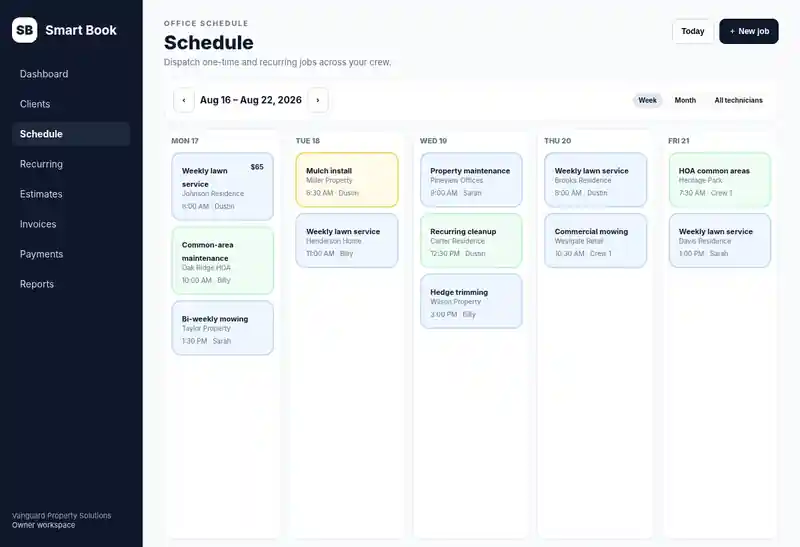
Recurring + one-time scheduling
Run repeat customers and one-off jobs from the same schedule.
Cleaning business software
Smart Book helps owner-led cleaning businesses keep weekly, biweekly, monthly, and one-time cleanings connected to client notes, reminders, cleaner assignments, invoices, card payments, receipts, and service history.
Try one job before you switch.
Add a client, schedule a job, and create an invoice during your free trial.
Try Smart Book for cleaning jobs7 days free · No credit card required · Then $30/month or $300/year if you continue.
Sign up with Google, or enter your email, choose and confirm a password, then verify your email. No card details.
See the product tour first7 days free · $30/month or $300/year · no per-tech Smart Book fee.
From scheduled to paid
Run repeat customers and one-off jobs from the same schedule.
Owner, admin, dispatcher, and technician roles are included in the current Smart Book plan.
Keep approvals, work, invoices, and customer history connected instead of splitting them across apps.
Connect Stripe for customer card payments, saved-card workflows, and receipts.
Explore the full field service software features, review Smart Book pricing, walk through the product tour, or see why Smart Book uses a flat-rate whole-crew plan.
Built for repeat cleaning schedules
Recurring cleaning gets difficult when schedules, lockbox details, client preferences, team assignments, and billing live in different places. Smart Book keeps the operational history centered on the client and service location.
Create weekly, biweekly, monthly, or one-time cleaning schedules instead of rebuilding the same appointments manually.
Keep addresses, access instructions, client notes, and service history tied to the job record your office and cleaners use.
Assign the technician or crew responsible for the visit and give field staff a focused My Day view of their assigned work.
Schedule deep cleans, move-in/move-out work, or other one-time services without creating a separate customer history.
Keep reminders, completion, invoices, card payments, receipts, and client history connected rather than chasing them in separate tools.
The current Whole Crew plan includes the owner, admin, dispatcher, and technician roles for $30/month or $300/year.
Recurring cleaning workflow
Create the customer once, then let the same record support repeat visits, changing assignments, billing, and service history.
Save contact details, address, access instructions, and service notes for the home or business.
Schedule weekly, biweekly, monthly, or one-time service depending on the client arrangement.
Put the visit on the schedule and assign the person or team responsible for that cleaning.
Use configured reminders for the customer while field staff work assigned visits from My Day.
Mark the visit complete and keep the completed service tied to the same client history.
Send or create the invoice when configured, record connected payments, and keep the receipt with the customer record.
Smart Book is designed for owner-led local crews that need the basics done reliably before they need enterprise complexity.
Cleaning business software FAQ
Yes. Smart Book supports recurring schedules along with one-time jobs.
Yes. Client and service-location records can keep addresses, access details, notes, and service history together.
Smart Book includes role-based access and technician My Day so field staff can work assigned jobs without broad office-finance access.
Yes. One-time services can live alongside recurring cleaning work on the same customer record.
Yes. Customer reminder and invoicing workflows are supported, with automation depending on the settings and providers you configure.
No. The current Whole Crew plan includes owner, admin, dispatcher, and technician roles for $30/month or $300/year.
Not currently. Smart Book focuses on CRM, scheduling, assigned field work, estimates, invoices, payments, and service history rather than payroll or HR-compliance systems.
Need to compare the broader workflow? See all Smart Book features, review the product tour, compare the $30/month Whole Crew plan, or review the Trust Center.
Founding 100 launch businesses can request free setup/import help during onboarding.
Start free