From the first customer call to the paid invoice — without stitching five tools together.
Smart Book connects recurring schedules, estimates, jobs, crew actions, invoices, and customer payments to the same client record.
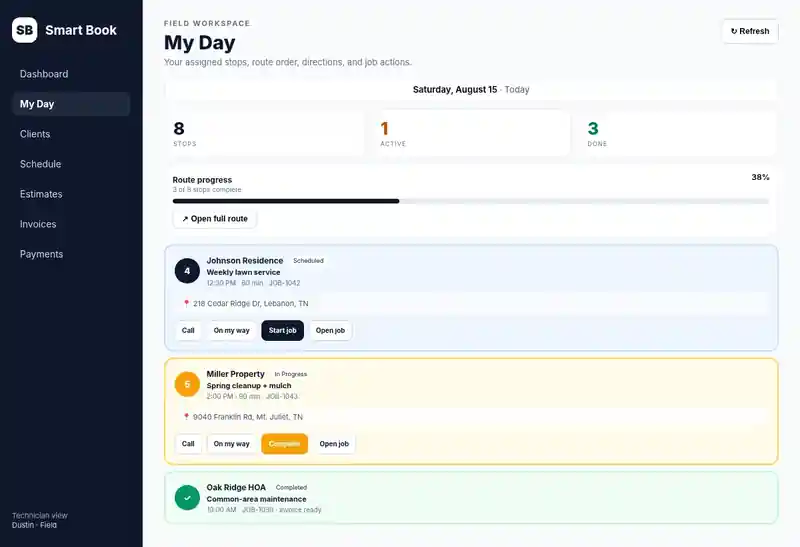
Smart Book My Day product screen populated with demo data.
Get clients out of notebooks and scattered apps
Keep contact details, service locations, notes, communication preferences, customer requests, files, and connected activity history together. Duplicate detection and merge tools help keep the client book clean.
Know what is scheduled, who has it, and what is next
Create one-time jobs, manage a calendar, assign team members, and keep office users and field technicians working from the same schedule.
Stop rebuilding recurring work by hand
Manage weekly, bi-weekly, monthly, and custom recurring schedules for businesses built around repeat service.
Estimate to approved job in one record
Build line-item estimates with discounts, tax, terms, notes, and expiration dates. Send secure customer approval links and convert accepted work into jobs.
Finish the job and know what is still owed
Create invoices, track balances and due dates, export PDFs, record payments, and keep invoices connected to the client and job that produced them.
Get paid by card without chasing checks
Connect your business Stripe account for customer invoice payments, saved-card workflows, and AutoPay when enabled and authorized.
Your crew sees their day from a phone
Technicians can use My Day for assigned jobs, route order, directions, job notes, attachments, start actions, and completion actions without broad office-finance access.
Give each person the access their job needs
Owner, admin, dispatcher, and technician roles separate management, office, financial, and field permissions — all included in the same Smart Book plan.
Follow up without remembering every message
Use appointment, invoice, overdue, and receipt workflows with customer email at launch. Managed text messaging is planned for a later Smart Book release.
See what needs attention before it becomes a problem
Review business activity, reporting surfaces, notifications, audit history, customer activity, and launch/QA diagnostics.
Bring your data in and take it back out
Import clients from CSV, export supported business data, manage account deletion, and keep subscription cancellation separate from business-data deletion.
Keep office, field, and financial access separated
Business-scoped access rules, restricted financial fields, server-side authorization, protected public-token flows, and provider-signature verification help keep business data separated.
Built around recurring, client-facing service work
Smart Book is particularly well suited to lawn care and landscaping, property maintenance, cleaning, pressure washing, pool service, mobile detailing, handyman work, pest control, HVAC, and similar local service businesses.
Scope: Smart Book is built for owner-led and growing local service teams, not as an enterprise multi-truck fleet-management suite.