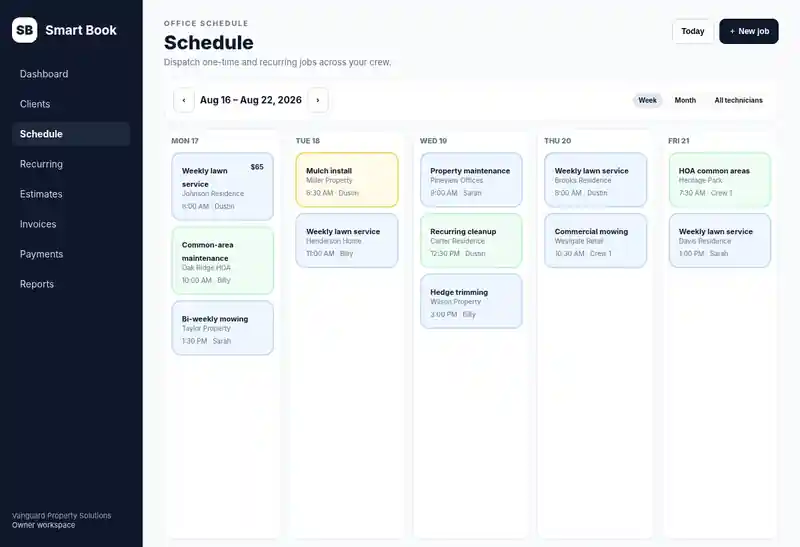
Recurring + one-time scheduling
Run repeat customers and one-off jobs from the same schedule.
Mobile detailing software
Smart Book helps owner-led mobile detailing businesses quote work, schedule at-home or workplace appointments, retain location notes, assign detailers, complete jobs, invoice customers, collect card payments, and keep repeat-client history.
Try one job before you switch.
Add a client, schedule a job, and create an invoice during your free trial.
Try Smart Book for detailing jobs7 days free · No credit card required · Then $30/month or $300/year if you continue.
Sign up with Google, or enter your email, choose and confirm a password, then verify your email. No card details.
See the product tour first7 days free · $30/month or $300/year · no per-tech Smart Book fee.
From scheduled to paid
Run repeat customers and one-off jobs from the same schedule.
Owner, admin, dispatcher, and technician roles are included in the current Smart Book plan.
Keep approvals, work, invoices, and customer history connected instead of splitting them across apps.
Connect Stripe for customer card payments, saved-card workflows, and receipts.
Explore the full field service software features, review Smart Book pricing, walk through the product tour, or see why Smart Book uses a flat-rate whole-crew plan.
Built for work that travels to the customer
Mobile detailing adds a location and travel layer to every appointment. Smart Book keeps each customer, service location, assigned detailer, completed job, and payment history together.
Schedule one-time or recurring work at the home, workplace, fleet site, or other saved service location.
Keep location details, access instructions, job notes, and prior service history connected to the customer record.
Use technician My Day for assigned stops, route order, directions, notes, and job actions.
Send estimates for services such as coatings or larger fleet work before scheduling approved jobs.
Keep completed work connected to invoices, card payments, receipts, and repeat-customer history.
The current Whole Crew plan includes owner, admin, dispatcher, and technician roles for $30/month or $300/year.
Mobile detailing workflow
Keep the customer, appointment location, assigned detailer, service history, and billing record connected from the first job forward.
Save contact details, the appointment address, access instructions, and relevant service notes.
Create an estimate when approval is needed, or schedule standard one-time or recurring detailing directly.
Place the appointment on the calendar and assign the person responsible for the job.
Detailers can see assigned stops, route order, directions, notes, and job actions from a phone-friendly view.
Mark the job complete and keep the visit tied to the same customer and service history.
Create or send the invoice when configured, accept connected payments, and keep the receipt with the customer record.
Smart Book is designed for owner-led local crews that need the basics done reliably before they need enterprise complexity.
Mobile detailing software FAQ
Yes. Jobs can be tied to service locations so the address, notes, and history stay connected to the customer.
Yes. Smart Book supports recurring schedules along with one-time jobs.
Yes. Technician My Day is designed for assigned stops, directions, notes, and job actions.
Yes. Estimates can be sent for approval and kept connected to the resulting customer job.
Yes. Smart Book supports invoicing and connected Stripe payment workflows.
No. The current Whole Crew plan includes owner, admin, dispatcher, and technician roles for $30/month or $300/year.
Not currently. Smart Book focuses on CRM, appointments, field assignments, estimates, invoices, payments, and repeat-customer history rather than specialized vehicle or inventory tooling.
Need to compare the broader workflow? See all Smart Book features, review the product tour, compare the $30/month Whole Crew plan, or review the Trust Center.
Founding 100 launch businesses can request free setup/import help during onboarding.
Start free