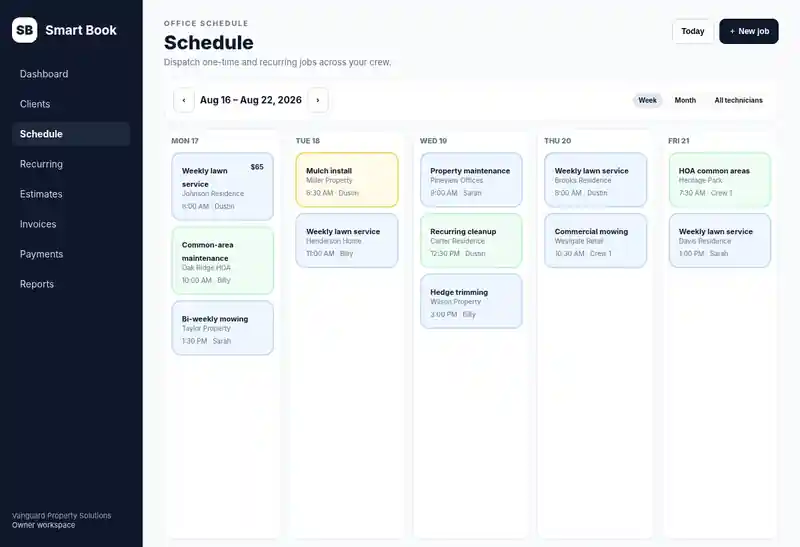
Recurring + one-time scheduling
Run repeat customers and one-off jobs from the same schedule.
Pressure washing software
Smart Book helps owner-led pressure washing companies move each customer from estimate to approval, scheduled work, crew completion, invoice, card payment, receipt, and service history without losing the trail between tools.
Try one job before you switch.
Add a client, schedule a job, and create an invoice during your free trial.
Try Smart Book for pressure washing jobs7 days free · No credit card required · Then $30/month or $300/year if you continue.
Sign up with Google, or enter your email, choose and confirm a password, then verify your email. No card details.
See the product tour first7 days free · $30/month or $300/year · no per-tech Smart Book fee.
From scheduled to paid
Run repeat customers and one-off jobs from the same schedule.
Owner, admin, dispatcher, and technician roles are included in the current Smart Book plan.
Keep approvals, work, invoices, and customer history connected instead of splitting them across apps.
Connect Stripe for customer card payments, saved-card workflows, and receipts.
Explore the full field service software features, review Smart Book pricing, walk through the product tour, or see why Smart Book uses a flat-rate whole-crew plan.
Built for estimate-driven exterior cleaning
Pressure washing is often won through a fast estimate, then delivered at a specific property with scope details the crew needs. Smart Book keeps that customer trail connected from quote through payment.
Create and send an estimate for customer approval before turning the work into a scheduled job.
Keep the service address, access details, job notes, and customer history attached to the same record.
Assign field work and use technician My Day for directions, notes, job actions, start, and completion.
Keep completed services and prior invoices in the customer history so future work starts from an existing record.
Create or send invoices when configured, accept connected card payments, and retain payment and receipt history.
The current Whole Crew plan includes owner, admin, dispatcher, and technician roles for $30/month or $300/year.
Pressure washing workflow
Keep the selling and service workflow connected so the office does not need to re-enter the same customer, property, and scope information at each stage.
Store the service address, contact details, access notes, and job context.
Create the quote and send an approval link when the work needs customer authorization.
Turn approved work into a job, select the date, and assign the responsible crew or technician.
Field staff can see assigned jobs, directions, notes, and job actions from a phone-friendly view.
Mark the work complete while preserving the relationship between the estimate, job, and customer.
Create or send the invoice when configured, accept connected card payments, and keep the receipt in customer history.
Smart Book is designed for owner-led local crews that need the basics done reliably before they need enterprise complexity.
Pressure washing software FAQ
Yes. Smart Book supports estimates and customer approval workflows that can stay connected to the resulting job.
Yes. Service locations can retain addresses, access details, notes, and job history.
Yes. Technician My Day is designed for assigned field work, including directions, notes, and job actions.
Yes. One-time and recurring work can stay connected to the same customer history.
Yes. Smart Book connects completed work to invoicing and supports connected Stripe payment workflows.
No. The current Whole Crew plan includes owner, admin, dispatcher, and technician roles for $30/month or $300/year.
Not currently. Smart Book focuses on CRM, estimates, scheduling, crew workflows, invoicing, payments, and customer history rather than aerial measurement or chemical-compliance tooling.
Need to compare the broader workflow? See all Smart Book features, review the product tour, compare the $30/month Whole Crew plan, or review the Trust Center.
Founding 100 launch businesses can request free setup/import help during onboarding.
Start free